This thing was important to lock your folder and make it secure from other user on
your PC. To do this is very easy,
without using any application.
Notice : this post will teach you how to lock a folder in Windows OS.
1. Open Notepad ( usually located in start > all programs > accesories > note pad )
2. Paste the code below to the note pad that you've opened :
============================================
cls@ECHO OFF
title Folder Locker
if EXIST "Control Panel.{21EC2020-3AEA-1069-A2DD-08002B30309D}" goto UNLOCK
if NOT EXIST Locker goto MDLOCKER
:CONFIRM
echo Are you sure u want to Lock the folder(Y/N)
set/p "cho=>"
if %cho%==Y goto LOCK
if %cho%==y goto LOCK
if %cho%==n goto END
if %cho%==N goto END
echo Invalid choice.
goto CONFIRM
:LOCK
ren Locker "Control Panel.{21EC2020-3AEA-1069-A2DD-08002B30309D}"
attrib +h +s "Control Panel.{21EC2020-3AEA-1069-A2DD-08002B30309D}"
echo Folder locked
goto End
:UNLOCK
echo Enter password to Unlock folder
set/p "pass=>"
if NOT %pass%==YOUR PASSWORD goto FAIL
attrib -h -s "Control Panel.{21EC2020-3AEA-1069-A2DD-08002B30309D}"
ren "Control Panel.{21EC2020-3AEA-1069-A2DD-08002B30309D}" Locker
echo Folder Unlocked successfully
goto End
:FAIL
echo Invalid password
goto end
:MDLOCKER
md Locker
echo Locker created successfully
goto End
:End
=============================================
3. change the red word to your wanted password, and save as to the folder that you want to lock. with name "Lock.Bat", close
4. open again and input you password, click again and will be shown "do you want to lock the folder (Y/N)"
5. and input Y > enter.
and your folder will be automatically locked

Showing posts with label Article and Information. Show all posts
Showing posts with label Article and Information. Show all posts
Sunday, July 08, 2012

Thursday, May 10, 2012
iOS Jailbreaking
iOS jailbreaking, or simply jailbreaking, is the process of removing the limitations imposed by Apple on devices running the iOS operating system through the use of custom kernels. Such devices include the iPhone, iPod touch, iPad, and 2nd Gen Apple TV. Jailbreaking allows users to gain root access to the operating system, allowing iOS users to download additional applications, extensions, and themes that are unavailable through the official Apple App Store. Jailbreaking is a form of privilege escalation, and the term has been applied to privilege escalation on other computer systems as well. The name refers to breaking the device out of its "jail",
a technical term used in Unix-style systems, for example FreeBSD jail. A jailbroken iPhone, iPod touch, or iPad running iOS can still use the App Store, iTunes, and other normal functions, such as making telephone calls.
Unlike rooting an Android device, jailbreaking is necessary if the user intends to run software not authorized by Apple. Under the Digital Millennium Copyright Act, jailbreaking iPhones is legal in the United States, although Apple has announced that the practice "can violate the warranty".Here is a few of iOS Jailbreaking service.
1. Redsn0w
Redsn0w is a free jailbreaking tool to jailbreake iPhone,iPod Touch, and iPad
2. Limera1n
Limera1n is a free jailbreaking tool that allows you to jailbreak iphone, iPod touch, and iPad.
Saturday, April 14, 2012
Best money earnings service
There's so many site that provides money earning service, such as advertise, link shorten, and many more. Here is a several of money earning site :
1. Adf.ly
Adfly is a link shortener service, Earn more than $4.00 / 1000 visitors to your links. Get tiny URLs, great for when text space is limited.All advertising is strictly family-safe with no popups. Frequent statistics with revenue breakdown. Refer users and get a massive 20% commission. Many tools - Mass Shrinker, Easy Link, API Easy-to-reach $5.00 minimum payout.
2. Bit.ly
Bitly is a link shortener service too, Bitly can helps you share, track, and analyze your links.
3. Google Adsense
Google adsense is a web advertising service that can provide ads on your website, you will get paid by per-clicking of the ads.
4. Adsense Camp
Adsense camp is a web advertising service too, but this is easier than google adsense
5. Link Bucks
LinkBucks allows you to make cash from the links your users post, from the links you place on your website, or from the posts you make in a forum. It is simple and easy to get started making money.
That is several of site that provided money earning service,
thanks so much from me, hope this can be useful.
1. Adf.ly
Adfly is a link shortener service, Earn more than $4.00 / 1000 visitors to your links. Get tiny URLs, great for when text space is limited.All advertising is strictly family-safe with no popups. Frequent statistics with revenue breakdown. Refer users and get a massive 20% commission. Many tools - Mass Shrinker, Easy Link, API Easy-to-reach $5.00 minimum payout.
2. Bit.ly
Bitly is a link shortener service too, Bitly can helps you share, track, and analyze your links.
3. Google Adsense
Google adsense is a web advertising service that can provide ads on your website, you will get paid by per-clicking of the ads.
4. Adsense Camp
Adsense camp is a web advertising service too, but this is easier than google adsense
5. Link Bucks
LinkBucks allows you to make cash from the links your users post, from the links you place on your website, or from the posts you make in a forum. It is simple and easy to get started making money.
That is several of site that provided money earning service,
thanks so much from me, hope this can be useful.
Thursday, March 08, 2012
Cara back up CD/ CD burning dengan nero
Nero adalah software untuk CD atau DVD burning/ back up. dibawah ini saya akan menjelaskan cara burning CD atau DVD.
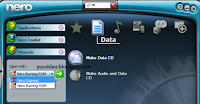


- Pastikan PC/ Laptop Anda sudah hidup dan sudah ada CD-RW atau DVD-RWnya. Saya sarankan menggunakan DVD-RW. Kenapa menggunakan DVD-RW cah? Karena : DVD-RW bisa digunakan untuk membakar/ burning CD dan DVD
- Pastikan Anda sudah meng-instal software Nero dan memasukkan CD atau DVD kosong/ belum ada Datanya alias blank ke PC/ Laptop Anda
- Oke, lanjut. Silakan double klik shortcut Nero StartSmart di desktop Anda
- Di atasnya menu Favorites, Data, Audio ada pilihan CD/ DVD, CD, DVD. Silakan dipilih (misalnya memilih CD)
- Kemudian klik menu Data. pilih Make Data CD
- Jika ingin menambahkan data yang akan di burning, klik add. Jika ingin menghapus data yang sudah ditambahkan, klik delete.
- Klik next. Muncul Final Burn Settings. Silakan isi kotak Disc name. Perhatikan! disebelah kiri ada tanda panah. Silakan klik, disitu ada pengaturan Writing speed, silakan diatur. Jika sudah klik burn.
- Tunggu proses burning. Jika sudah selesai muncul pemberitahuan : Burn process completed successfully. Klik OK.


Subscribe to:
Posts (Atom)